ประโยชน์จาก LINEBOT และ Google Apps Script
ให้ Linebot ตอบคำถามแก้ไขปัญหาเบื้องต้น พร้อมบันทึก LogUserID ลดงานฝ่าย Support ลงได้
1.) เตรียมข้อมูลใน Sheet ( Faq ) พร้อมคำตอบลงในแผ่นงาน
2.) เตรียมข้อมูลใน Sheet ( Maybe ) พร้อมคำตอบลงในแผ่นงาน
3.) เตรียมแผ่นงาน ( LogUserID ) เพื่อใช้สำหรับบันทึกข้อมูลการใช้งานผู้ใช้ Line
4.) เมื่อเตรียมข้อมูลแล้วไปที่ "เครื่องมือ" เลือก "<>โปรแกรมแก้ไขสคริปต์"
5.) Copy Code ด้านล่างโดยแก้ไข Token และ Sheet เป็นของตัวเอง
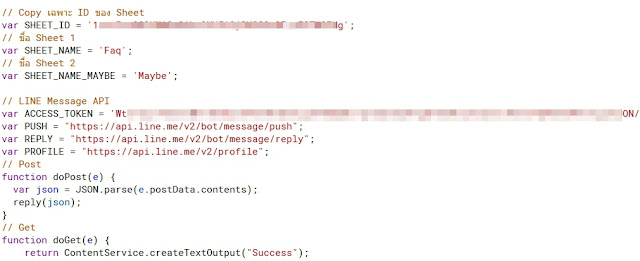
// Copy เฉพาะ ID ของ Sheet
var SHEET_ID = 'ID Sheet';
// ชื่อ Sheet 1
var SHEET_NAME = 'Faq';
// ชื่อ Sheet 2
var SHEET_NAME_MAYBE = 'Maybe';
// LINE Message API
var ACCESS_TOKEN = 'Token';
var PUSH = "https://api.line.me/v2/bot/message/push";
var REPLY = "https://api.line.me/v2/bot/message/reply";
var PROFILE = "https://api.line.me/v2/profile";
// Post
function doPost(e) {
var json = JSON.parse(e.postData.contents);
reply(json);
}
// Get
function doGet(e) {
return ContentService.createTextOutput("Success");
}
// Reply
function reply(data) {
var lineUserId = data.events[0].source.userId;
var postMsg = data.events[0].message.text;
var replyToken = data.events[0].replyToken;
var action = data.events[0].message.action;
// บันทึกคำค้นหาและ userId สำหรับการบันทึก
// debug(postMsg, lineUserId);
debug(action, lineUserId);
// ค้นหาคำตอบสำหรับคำค้นหาจาก Sheet
var answers = findResponseArray(postMsg);
// สร้างข้อความคำตอบ
var replyText = '「' + postMsg + '」นี่คือคำแนะนำ ลองทำตามดูก่อน';
// คำถาม ขึ้นอยู่กับมีหรือไม่มีคำตอบ
if (answers.length === 0) {
// ตรวจสอบ "คำค้นหาที่คล้ายกัน"
var mayBeWord = findMaybe(postMsg);
if (typeof mayBeWord === "undefined") {
// แก้ไข คำถาม / ปัญหาที่อยากหา เมื่อไม่มีคำตอบ
sendMessage(replyToken, 'ไม่พบคำถามที่อยู่ในระบบ ลองถามคำถามใหม่');
} else {
sendMayBe(replyToken, mayBeWord);
}
} else {
// การสร้างข้อความเมื่อมีคำตอบ
answers.forEach(function(answer) {
replyText = replyText + "\n\n==↓↓==\n\nปัญหา:" + answer.key + "\n\nการแก้ไข:" + answer.value;
});
// ตัดคำหากเกิน 500 ตัวอักษร
if (replyText.length > 500) {
replyText = replyText.slice(0,500) + "……\n\n==↓↓==\n\nคำถามนั้นมากกว่าจำนวนตัวอักษรที่กำหนด โปรด จำกัด รายละเอียดคำค้นหาให้แคบลง";
}
// การส่งข้อความ API
sendMessage(replyToken, replyText);
}
}
// รับข้อมูลจาก Sheet 1
function getData() {
var sheet = SpreadsheetApp.openById(SHEET_ID).getSheetByName(SHEET_NAME);
var data = sheet.getDataRange().getValues();
return data.map(function(row) { return {key: row[0], value: row[1], type: row[2]}; });
}
// รับข้อมูลจาก Sheet 2
function getMayBeData() {
var sheet = SpreadsheetApp.openById(SHEET_ID).getSheetByName(SHEET_NAME_MAYBE);
var data = sheet.getDataRange().getValues();
return data.map(function(row) { return {key: row[0], value: row[1], type: row[2]}; });
}
// ส่งคืนอาร์เรย์ของคำตอบสำหรับเซลล์ที่มีคำที่ตรงกัน
function findResponseArray(word) {
// พื้นที่การค้นหา
word = word.replace(' ',' ');
// แบ่งออกเป็นอาร์เรย์สำหรับแต่ละคำ
var wordArray = word.split(' ');
return getData().reduce(function(memo, row) {
// ไม่ว่าจะเป็นค่ารวม
if (row.value) {
// และไม่ว่าจะเป็นคำทั้งหมดจะรวมอยู่ในการค้นหา
var matchCnt = 0;
wordArray.forEach(function(wordUnit) {
// ถ้ามีคำตอบที่ถูกต้อง
if (row.key.indexOf(wordUnit) > -1) {
matchCnt = matchCnt + 1;
}
});
if (wordArray.length === matchCnt) {
memo.push(row);
}
}
return memo;
}, []) || [];
}
// ส่งคืนคำตอบ "บางครั้ง" ของเซลล์ที่จับคู่คำ
function findMaybe(word) {
return getMayBeData().reduce(function(memo, row) { return memo || (row.key === word && row.value); }, false) || undefined;
}
// การส่ง API ในรูปแบบภาพ
function sendMessageImage(replyToken, imageUrl) {
var postData = {
"replyToken" : replyToken,
"messages" : [
{
"type": "image",
"originalContentUrl": imageUrl
}
]
};
return postMessage(postData);
}
function sendMessage(replyToken, replyText) {
var postData = {
"replyToken" : replyToken,
"messages" : [
{
"type" : "text",
"text" : replyText
}
]
};
return postMessage(postData);
}
function sendMayBe(replyToken, mayBeWord) {
var postData = {
"replyToken" : replyToken,
"messages" : [
{
"type" : "template",
"altText" : "คำถามของคุณหมายความว่า่" + mayBeWord + "」แบบนี้หรือไม่?",
"template": {
"type": "confirm",
"actions": [
{
"type":"postback",
"label":"Yes",
"data":"action=detail",
},
{
"type": "message",
"label": "No",
"text": "ไม่มันไม่ใช่"
}
],
"text": "ไม่พบคำตอบ บางทีคำค้นหาคือ「" + mayBeWord + "」แบบนี้หรือไม่?"
}
}
]
};
return postMessage(postData);
}
function postMessage(postData) {
var headers = {
"Content-Type" : "application/json; charset=UTF-8",
"Authorization" : "Bearer " + ACCESS_TOKEN
};
var options = {
"method" : "POST",
"headers" : headers,
"payload" : JSON.stringify(postData)
};
return UrlFetchApp.fetch(REPLY, options);
}
function getUserDisplayName(userId) {
var url = 'https://api.line.me/v2/bot/profile/' + userId;
var userProfile = UrlFetchApp.fetch(url,{
'headers': {
'Authorization' : 'Bearer ' + ACCESS_TOKEN,
},
})
return JSON.parse(userProfile).displayName;
}
// userId
function lineUserId(userId) {
var sheet = SpreadsheetApp.openById(SHEET_ID).getSheetByName('userId');
sheet.appendRow([userId]);
}
// debug
function debug(text, userId) {
var sheet = SpreadsheetApp.openById(SHEET_ID).getSheetByName('LogUserID');
var date = new Date();
var userName = getUserDisplayName(userId);
sheet.appendRow([userId, userName, text, Utilities.formatDate( date, 'Asia/Bangkok', 'yyyy-MM-dd HH:mm:ss')]);
}
6.) เมื่อทำการ Save และ Allow Permissions เสร็จเรียบร้อยแล้ว มาลองคุยกับบอท


